Chapter 7: 6:15 AM
Ninety days after Henderson's puts MapleCo on probation, it's a different company, and Sam has a choice to make on a Friday afternoon. Plus the 90-day playbook, the worksheets, and the checklist for choosing any automation provider.
Want to keep reading?
Enter your email to unlock all chapters and get the complete book as a PDF.
Get the Full Book
We'll email you the complete PDF and unlock all chapters to read right here on the site.
You're in! All chapters are now unlocked.
We've also emailed you the PDF of Stop Being the Glue. Check your inbox.
Download the PDF NowSomething went wrong. Please try again.
Book download is not currently available. Please try again later.
Sam’s alarm goes off at 6:15 AM.
Not 5:47. She changed it six weeks ago and has not changed it back.
She makes coffee first. Then she checks her phone.
The dashboard shows:
Purchase orders: 8 received overnight, 7 processed automatically, 1 exception flagged (new customer, needs verification).
Shipping notifications: All tracking numbers sent within 15 minutes of label creation.
Payment matching: Yesterday’s deposits matched against open invoices. Two items need review: a Henderson’s wire that covers four invoices (the system matched three and flagged the fourth for Lisa), and a restaurant payment that came in $86 short with no explanation, which the system won’t accept on its own.
Monitoring: No anomalies. All systems green.
Sam reads the exception summaries. The new customer looks legitimate. It’s a referral from Mrs. Chen, who has started sending other restaurant owners Sam’s way. Sam approves the new account in the system and moves on.
Three decisions. Eight minutes.
The payment matching line is new. Phase 2: $10,000 plus HST, built over the summer, during probation, one careful piece at a time. Its support folds into the same monthly fee.
It started on a Wednesday in July, with Lisa’s spreadsheet on the boardroom screen. Oscar had asked to see it twice. Twice, Lisa said “after month-end.” The third time, she brought it in herself.
“Columns M through Q,” she said. “Nobody touches them. Today you get to touch them.”
Column M was the amount of the wire. N was the customer, which Lisa worked out from the reference number, because Henderson’s reference numbers look like someone sat on a keyboard. O was the invoices she thought the wire covered. P was the difference. Q was a colour. Green meant matched. Yellow meant probably, check Friday. Red meant call Henderson’s accounts payable. Purple, Lisa admitted after some pressure, meant the bank took a fee, I wrote it off, and nobody needs to know.
“There’s a rule for purple?” Oscar asked.
“There’s a rule for everything. It’s just never been written down.”
It took two afternoons to write it down. Henderson’s paid four invoices with one US-dollar wire, minus a bank fee, and Lisa matched them by trying combinations of open invoices until the total landed within a few dollars, at the exchange rate on the day the wire arrived. One customer always short-paid by exactly the amount of a credit note they never mentioned. Another paid US-dollar invoices in Canadian dollars, every time, at whatever rate they felt like that week.
Oscar built the matcher to do what Lisa did, in the order she did it. It clears bank fees and exchange-rate differences under a limit Sam approved, and it stops and asks about everything else, including any short payment nobody can explain. The first month-end it ran, it matched most of the deposits on its own. Lisa did the rest in an afternoon instead of two days.
“Purple’s in there too,” Oscar told her. “It’s called bank fee variance under the approved limit. Sam’s name is on the limit.”
Lisa looked at the screen for a while. She saved a copy, because she’s Lisa. Then she deleted the columns.
Sam gets to the office at 8:30. Not 7:15.
Lisa is already at her desk, on the phone with a producer in Quebec, negotiating next season’s rate on Grade A Amber. Her margin sheet is open beside the call. She built it in the spring, out of the hours the PO system gave back, and it is about to change what MapleCo sells.
Last week she booked the boardroom for twenty minutes and set a bottle of Grade A Golden on the table, next to the margin sheet.
“You’ve always called Golden the niche grade,” she said, and turned the sheet around. Golden had the highest margin per unit of anything MapleCo sold, and restaurant orders for it had gone up every month since spring. “I want to pitch a Golden Premium line to the high-end restaurants. Two chefs have already asked for it in a smaller bottle.”
It was the first product recommendation in MapleCo’s history that came with numbers attached. Sam said yes before she’d finished reading.
Lisa didn’t pick up the bottle. “There’s a second thing.”
She had it written down, four lines on an index card. The producer rates. The exception calls to customers. The questions Oscar’s team brings her when a purchase order doesn’t make sense. The sheet on the table. None of it was the job Sam hired her for.
“I spent eight years proving I could absorb boring work without complaining,” Lisa said. “Turns out that’s not the same as proving what I’m actually good at.”
Sam read the card twice. She had known every line on it. She had never seen them in one place.
“You’ve been doing this job since June,” Sam said. “I’ve been paying you for the old one. What’s the number?”
Lisa told her. Sam had a number in mind too. Lisa’s was higher. Sam wrote Lisa’s down.
One Friday in September, Lisa closed her laptop at 5:15 because she was done. Actually done. She drove home without rehearsing Monday’s inbox in her head. She stopped for groceries without calculating whether she had time. She made dinner at a normal hour and didn’t check her phone once.
Nobody threw a party. It was just a Friday. It was the first one in years that started when she left the office.
Marcus walks in at 8:45 with a coffee and a stack of call notes.
Greg has asked him for a buyer analysis: which Henderson’s regions are buying more Amber, and when. Marcus is building it in the company’s ChatGPT workspace, from the sales export Lisa set up for exactly this. Both are on the approved list: the workspace, and the data it’s allowed to see. Before anything leaves the building, he walks the figures over to Lisa.
She reads the first page. “This is by quarter. What’s Greg deciding with it?”
“Holiday orders.” Marcus checks his call notes. “On Monday he said the Northeast ran out of Amber the second week of December. Two years running.”
“Then quarters won’t show him anything.” Lisa breaks the totals into weeks. Every year, the Northeast’s Amber orders climb through November and drop back to the standing order in the first week of December. Then she stops at the list of regions. “This one’s in twice.”
Marcus fixes it. “So they don’t need a bigger November. They need the extra to keep coming through December.”
“Put that on page one.”
He does, and sends Greg the report as a PDF. Not a link.
He still keeps the approved tool list. It’s an administrative job, and he does it like one: a spreadsheet, a quarterly reminder, a column for who approved what. Sam approves anything new for business use. Dave and Oscar look at the technical side first.
In September, when the probation ended, Sam gave him Greg Hollis’s weekly call. Not the whole account. Just the call. It’s the first piece of Henderson’s she has let go of in twelve years.
Last Tuesday at 10:12 AM, Lisa got an email from Oscar’s team.
Their monitoring had flagged that Golden Dragon’s purchase orders were suddenly taking three times as long to process. Mrs. Chen had moved to a new ordering system with a new PO layout. Oscar’s team had already mapped the new layout, and they’d found three things they couldn’t decide on their own.
Two were small. A store code now sat where the delivery address used to be. A pallet deposit line shouldn’t become a line on the order. The third was the one that mattered. The new system picked grade names from a dropdown. Did “Dark” on these POs still mean Amber?
Lisa called Mrs. Chen. Mrs. Chen laughed and said the new system chose the words for her now, so yes, Dark meant Dark. Lisa wrote back with all three answers in under ten minutes.
By two o’clock the updated extractor was live, after Oscar’s team had run twenty test orders through it first. The rule Lisa had carried in her head for years, the one that cost Sam a courier and an evening last October, was retired for the new layout and kept for anything in the old one, with a note explaining why.
Nobody else at MapleCo noticed anything had happened.
Lisa noticed one thing. For years, people had asked her where the exchange rate was and why the printer was jammed. This time someone had asked her what a purchase order meant, because she was the one who’d know.
When Sam heard about it, she thought about Ray’s forklifts.
Ray Beaulieu, for the record, has not become an evangelist for technology.
The release stack comes off the printer before his crew gets in, sorted by pickup, with the fixed dates on top. Ray reads the top slip, hands the stack to his lead hand, and goes out to look at the trucks. He hasn’t phoned the office about a wrong packing slip since June.
He still has his whiteboard. He still has his binder. These days the whiteboard is mostly routing, and the binder mostly stays shut. The time he used to spend cross-referencing goes to the things he actually cares about: loads, routes, and making sure the Grade A Amber doesn’t sit next to the heating vent.
The Henderson’s account renewed.
The Q2 scorecard came in first. Order accuracy: 98%. Delivery timeliness: 96%. Invoice consistency: 99%. Above threshold on all three, for the first time in a year. Greg Hollis called to say so, which he didn’t have to do.
The 90-day probation ended without incident. Every compliance report was clean. Every attestation was filed. Henderson’s restored the 15% they’d pulled during probation, and Greg mentioned that MapleCo was being considered for their holiday promotion lineup. Not confirmed yet, but on the list.
When he told Sam, he said something that she wrote down: “We’ve been working with you for five years, and the last three months have been the most reliable. Whatever you changed, it shows.”
She didn’t automate the syrup. She automated everything around the syrup.
Gerald’s quarterly review is the last Thursday in September, in his office above the pharmacy on Dundas Street, with the same pen he has used for twenty years.
He goes through the numbers in order. Revenue is up, by less than last year, and he pencils Henderson’s probation in the margin beside it. Receivables days are down, because invoices now post the day an order ships. The shipping error rate is the lowest he has on file for MapleCo.
Then he turns to a fresh page.
“Last October,” he says, “I told you your margin per hour of your own time was going down.” He copies last year’s figure onto the page. “How many hours a week are you working now?”
“Forty-five. Some weeks forty.” She opens her notebook to the page where she has kept count since July. Gerald copies the numbers out, one week at a time.
Then he divides. He does it slowly, the way he does everything, and then he does it again to check. He writes the new figure under last year’s. It’s bigger. Not by a little.
He puts down his pen and takes off his glasses.
“Huh,” he says.
Then he puts his glasses back on, and they move on to tax planning.
Oscar comes by the office one afternoon, not for a project meeting, just for coffee.
Sam’s working from the boardroom. The whiteboard that Oscar covered in process maps back in March has been erased and rewritten a dozen times since. The current version shows MapleCo’s automation roadmap: what’s live, what’s next, what’s planned for next year.
“You’ve got a roadmap,” Oscar says, looking at the board. “In March, you had six browser tabs and a prayer.”
Sam laughs. “I also had a $30,000 software licence I was afraid to cancel.”
“Did you cancel it?”
“Turned off auto-renew. It dies in January.” She pauses. “I added it up, by the way.”
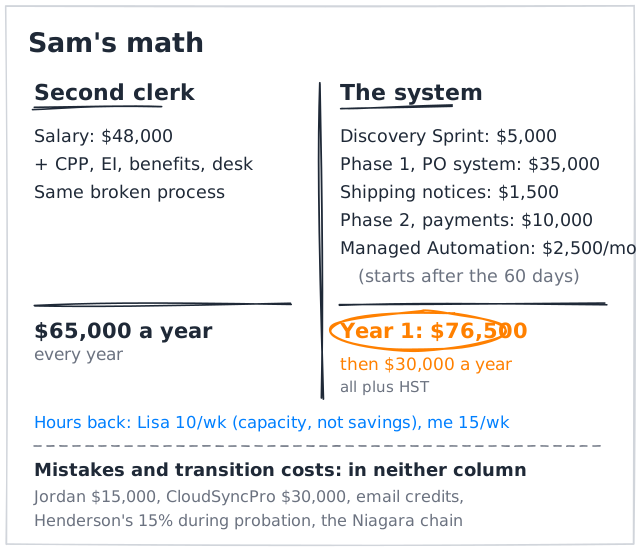
She walks to the whiteboard, grabs a marker, and draws two columns. Oscar watches, his coffee in one hand and his phone in the other.
“Second clerk,” she says, writing. “Forty-eight thousand in salary. With CPP, EI, benefits and a desk, $65,000 a year. Every year.”
She writes the second column. “The system. Discovery, Phase 1, the shipping notifications and Phase 2: $51,500. Managed Automation starts after the sixty days, so ten months of it in year one. That’s $76,500, plus HST.” She circles it. “More than the clerk. After that, it’s $30,000 a year. Less than half.”
Under both columns she draws a line and writes mistakes and transition costs. Jordan. CloudSyncPro. The credits after the email blowup. Henderson’s 15 percent during probation. The Niagara chain, which had moved to another supplier by the time she called to follow up, politely and for good. “None of that goes in either column. It’s spent whichever way I go, and it doesn’t prove anything.”
Under the second column she writes Lisa: 10 hours a week. “Those aren’t savings. She’s still here, and she’s about to cost me more, not less. That’s capacity.” Under it she writes her own: Sam: 15 hours a week.
Oscar looks at the whiteboard for a while. “Most people put the old mistakes in the new column. It makes the payback look faster.”
“I thought about it,” Sam says.
She caps the marker and looks at the roadmap. “Who keeps that moving next year? Me?”
“Some clients have us do it. A Fractional Chief Automation Officer: we sit in on the roadmap and keep it moving with them.” Oscar looks at the board, then out at Lisa’s desk. “You don’t need that yet.”
“How’s Ray taking all this?” he asks.
“I asked him what he thought of the new systems. He thought about it for a long time.” Sam does Ray’s voice, badly. “‘The packing slips are right now.’ That was the whole review.”
Oscar finishes his coffee and stands up.
“Can I give you one piece of advice?” he says.
“You’re going to give it whether I say yes or not.”
“Probably.” He leans against the doorframe. “The owner has to let go. You can build good systems and still choke the business if you insist on being the monitoring system yourself.”
Sam winces. “The Henderson’s override.”
“The Henderson’s override. Every owner I work with hits that wall. Building something that works without you isn’t a loss. It’s the whole point.”
Sam looks at the roadmap. “You could have told me that on day one.”
“Would you have heard it?”
She thinks about it. “No.”
“That’s why I didn’t.”
“You’ve checked our dashboard three times since you sat down,” Sam says. “For a coffee.”
Oscar looks at the phone in his hand. He puts it in his pocket.
“Old habit,” he says.
Sam walks him out.
On the first Friday in October, at 3:45 PM, Greg Hollis emails.
Henderson’s wants a product-by-product breakdown and a proposed assortment for the holiday promotion. Sixty-two stores, custom mix, regional preferences. He needs it by Wednesday.
Maya’s first game of the season starts at 5:00. The arena is twenty minutes away.
A year ago, this is the email that would have kept Sam at her desk until midnight, pulling numbers from three spreadsheets that didn’t agree. She’d have done it from a campground if she had to. She has.
Sam starts opening tabs.
Lisa looks up from her margin analysis. “Go to the rink.”
“It’s Henderson’s.”
“I know who it is. The data’s in one place now. Marcus and I have this.”
Sam looks at the email. Then at Lisa, who hasn’t gone back to her screen, and at Marcus, who already has the Henderson’s export open. Then she closes the tabs, one at a time, shuts the laptop, and picks up her coat.
She’s halfway to the door when Lisa says it anyway. “Sam. Go.”
“I’m going.”
Sam gets to the arena with ten minutes to spare. Ben is already in the stands behind the net Maya defends in the first period, his coat on the seat beside him. He moves it when he sees her. He doesn’t make a thing of it. He just hands her the second coffee he bought on the off chance.
During warm-up, Maya spots her through the cage and does a double take. Then she taps her stick on the ice, twice, which Sam is fairly sure is goalie for hi, Mom.
The game starts. Sam’s phone is in her pocket, not her hand.
At the end of the first period, her hand goes to her pocket on its own. Twelve years of muscle memory. There’s one text, from Lisa:
Henderson’s proposal sent. Five days early, Golden Premium margin breakdown attached. Marcus checked every SKU. Ray says hi, which is a first. Also, I took away your QuickBooks login until Monday. Watch the game.
Sam laughs out loud, loud enough that the parent on her other side looks over. She holds the side button until the screen goes black and drops the phone into her coat pocket.
Ben watches her do it. He doesn’t say anything. He bumps her shoulder with his, once, and leaves it there. They stand up together as Maya skates back out to her crease.
Maya’s team wins 3-1. Sam walks to the parking lot with her arm around her kid and Ben carrying the goalie bag, talking about the game, not about invoices.
A year ago, Sam was a data entry clerk who happened to own a maple syrup company.
Today, she’s the owner again.
Afterword
In Chapter 1, Sam sits in her driveway with the engine off and thinks: There has to be a better way to do this. Most owners who call me have had that thought somewhere, usually late at night. The businesses that thrive are the ones where it leads to action.
Sam’s story is fictional. Her company doesn’t exist. But her problems do. I’ve seen them in construction companies where the bookkeeper enters every subcontractor invoice twice, once in the project management system, once in the accounting system. I’ve seen them in healthcare clinics where the billing team spends half their day fighting with payer portals. I’ve seen them in law firms where the practice management software is so old it can’t connect to anything, so the staff prints documents and re-enters data by hand. I’ve seen them in Indigenous band offices where overworked administrators spend days assembling federal reports that could be generated in hours.
Every one of those organizations had a Sam. Every one of them had a Lisa, someone brilliant, buried under work that didn’t deserve their talent. And every one of them had the same realization, sooner or later: the problem isn’t the people. It’s the systems.
Systems aren’t the whole story, though. Sam’s fourth failure was Sam. I don’t write this from the finish line. I juggle customer projects, support, and products of my own too. I can get interested in the next useful thing to build while some ordinary piece of work still depends on me remembering to do it. Knowing how to automate something doesn’t automatically make you good at delegating it, or at stepping away from it. That’s part of why this subject matters to me.
If you keep five things from Sam’s year, keep these.
Start with your problem, not with technology. Sam hired, bought software and had Dave wire up a zap before anyone wrote down what the work actually was. Each fix was aimed at a problem nobody had described.
See your business clearly. The real process is the one Lisa does, with the cover sheet, the three price lists and the rule about Golden Dragon. The three-sentence version is the one that gets automated wrong.
Start small. One workflow, tested on orders it had never seen, run alongside the manual process until the results matched. Then the next one.
Build guardrails. A one-page AI policy, one price list, and monitoring that tells someone when a person is working around the system. Sam built all three after they cost her. Build yours before.
Invest in your people. The system gave Lisa back ten hours a week. What made them worth something was Lisa.
The rest follows.
About the Author
I run DigitalStaff, a business automation agency in London, Ontario. Since 2017, we’ve built custom AI and automation for more than 50 organizations across construction, healthcare, distribution, legal, education, non-profit and Indigenous communities.
I found automation at twelve: a bot I downloaded to mine iron ore in RuneScape overnight on the family computer. Years later I built my own, one that fought scorpions. That’s the one I tell Sam about in Chapter 3. I still can’t play RuneScape.
Bring me one workflow
If Sam’s story sounds familiar, book a free intro call with me. Bring one workflow that eats your team’s week, and a completed discovery worksheet from Appendix A if you’ve filled one in. You tell me how the work actually happens today. I’ll tell you what’s worth automating, what isn’t, and roughly what it would take.
Book a time at digitalstaff.ca/contact.
Thank you for reading. Now go build something.
Appendix A: Your 90-Day Playbook
Sam’s story took a year, and most of that year was detours: a hire, a software licence, a zap that went off at 2 AM, an override, and two boring fixes she put off until they bit her. Strip out the detours and the first real win fits in about ninety days.
Ninety days gets you a first win, not a finished system. The schedule below is an example. Yours will stretch or shrink with the work.
Weeks 1 to 2: Pick the problem
Pick one problem and measure the baseline: hours a week, errors a month, how long a customer waits. Find out which AI tools your people already use, and for what. Name an owner for the problem and an owner for the AI rules. Put the minimum AI rules and the approved accounts in place. Appendix D is a starting point.
Sam wrote her AI policy after the crisis. Write yours in week one.
Weeks 3 to 4: Document it
Write down the real steps and the exceptions, the ugly version. The worksheet below helps. Decide which data source wins when two of them disagree. Check your providers’ terms and your customer agreements before customer data goes near a new tool. Choose the pilot. Decide what success looks like, and what the fallback is if it doesn’t work.
Weeks 5 to 8: Build and test one workflow
Build one bounded workflow. Test it on representative samples, then on samples nobody has tuned it against. Keep a person reviewing anything the system is unsure about, release work in a controlled way, and log and monitor everything. Run it in parallel with the manual process where that makes sense. You won’t find every edge case in advance, so plan for the ones you miss.
Weeks 9 to 10: Measure and tighten
Measure the results against your baseline. Strengthen training and controls where the pilot showed gaps. Clean up the old tools, spreadsheets and stored data the new workflow replaced. Confirm your people can still run the fallback.
Weeks 11 to 12: Choose what’s next
Use the measured results to choose the next process. Write down who owns the new workflow and who supports it.
The goal isn’t to automate everything. The goal is to stop being the glue, to build systems that let your business run without requiring your involvement in every transaction, every approval, every email.
The Numbers That Matter
When it’s working, here’s what you should see:
Hours reclaimed: In Sam’s case, about ten hours a week for Lisa plus two days at every month-end, and about fifteen hours a week for Sam, once the PO system, the shipping notifications and payment matching were all running. Measure yours against the baseline you took in week one.
Error reduction: An illustrative target, not a promise: something like 90 to 95% fewer data entry mistakes on the workflow you automated. Your baseline tells you whether you got there.
Response time: Customer inquiries answered in minutes, not hours.
Owner time: Your work shifts from operational to strategic, from data entry to decision-making.
Key-person risk: Reduced, because the system holds the knowledge that used to live in one person’s head. Appendix B helps you find it.
Outside the Story
Every price in Sam’s story is an example: what a project of MapleCo’s scope costs. Outside the story, DigitalStaff offers four things.
Discovery Sprint. The work mapped as it actually happens, exceptions included, and a written roadmap with a fixed price for each piece worth building. The roadmap is yours either way.
Builds. One workflow at a time, at a fixed price agreed after discovery, with monitoring and support after go-live.
Managed Automation. A monthly service after a build: hosting, monitoring that alerts around the clock, a person who responds within your plan’s response time, fixes, and retuning when something changes.
Fractional Chief Automation Officer. Roadmap leadership plus build capacity, for owners who want someone driving the roadmap with them.
For current prices, see digitalstaff.ca/pricing.
Worksheet: Process Discovery
These are Oscar’s questions from Chapter 4, laid out as a worksheet. Fill one in for each of your three most painful processes. Sam and Lisa filled three legal pads.
Write the ugly version: one step per row, in the order the steps really happen, including the one where step four is “call the owner because she’s the only one who knows the password.” Count active time, the minutes someone is actually working on it, separately from waiting and interruptions. Then list where it breaks, and every rule that lives in someone’s head.
Example: a customer purchase order at MapleCo, before automation
Starts when a PO email lands in the shared inbox. Ends when the packing slip prints on Ray’s dock. Who: Lisa, every step.
| # | Step | System | Data moved | Active time | Waiting, interruptions |
|---|---|---|---|---|---|
| 1 | Spot the PO, save the PDF | Shared inbox | PDF, email to desktop | 1 min | Sits until Lisa gets to it |
| 2 | Start a sales order, type every field | QuickBooks Online | Customer, PO number, lines: PDF to QuickBooks | 5 to 8 min | Phone calls, emails, the printer |
| 3 | Check each price | Price sheet, contracts | Prices, sheet to QuickBooks | 2 to 4 min | Asking Sam about a deal only she knows |
| 4 | Check the exchange rate (US customers) | Bank website | Rate, bank to QuickBooks | 1 min | |
| 5 | Save. The packing slip prints | QuickBooks Online | Order, QuickBooks to Ray’s printer | 1 min | |
| 6 | Add a tracker row, mark it Received | Google Sheet | PO details, QuickBooks to sheet | 2 min | |
| 7 | File the email | Shared inbox | None | Under 1 min |
Totals: 12 to 18 minutes of active time per order, about 50 orders a week. Six interruptions in one two-hour morning.
Where it breaks
- Step 2: a wrong quantity or grade, typed while the phone rings.
- Step 3: three price lists that don’t agree, and prices agreed by phone that aren’t on any of them.
- Step 5: an order changes after its slip prints, and the dock loads from the old slip.
Exception rules nobody wrote down
- Henderson’s: skip page one. It’s a cover sheet.
- Henderson’s: a PO priced under the contract rate means they’re working from an old agreement. Send the current one before filling the order.
- Golden Dragon: “Dark” means Grade A Amber.
- Carbon-paper faxes: if a quantity is smudged, call the restaurant. Don’t guess.
Now yours. Process: ________________________________
Starts when: ________________________________
Ends when: ________________________________
| # | Step | Who | System | Data moved (from, to) | Active time | Waiting, interruptions |
|---|---|---|---|---|---|---|
| 1 | ||||||
| 2 | ||||||
| 3 | ||||||
| 4 | ||||||
| 5 | ||||||
| 6 | ||||||
| 7 | ||||||
| 8 |
Where it breaks
- Step ____: ________________________________
- Step ____: ________________________________
Exception rules nobody wrote down
- When ________________, do ________________
- When ________________, do ________________
Worksheet: Sam’s Math
Compare hiring and automating for the same work, over the same period, in the same units: one year, the same workflows, dollars before tax, hours per week. Sam’s numbers are filled in as an example.
| Line | Hire a second clerk | Automate the work |
|---|---|---|
| Work covered | PO entry, tracking emails, payment matching | The same three workflows |
| Cost, year one | $65,000, plus a recruiter’s fee and training time | $76,500: $51,500 for discovery and three fixed-price builds, plus ten months of Managed Automation at $2,500 |
| Cost, each year after | $65,000, plus raises | $30,000 |
| Avoided hire (all-in: salary, CPP, EI, benefits, equipment) | None. This is the hire. | $65,000 a year |
| Cash costs reduced (credits, couriers, reships, write-offs) | Few. The process stays the same. | Fewer credits, couriers and reships. Measure them; don’t guess. |
| Staff capacity recovered (capacity, not payroll savings) | A new person’s hours, minus the training | Lisa: about 10 hours a week, plus two days at month-end |
| Owner hours recovered | Little. Sam still checks everything. | Sam: about 15 hours a week |
| Customer and concentration risk | The rules still live in people’s heads | The rules live in the system. Henderson’s is back above threshold. |
Mistakes and transition costs. Keep these on their own line, in neither column: Henderson’s 15% cut during probation, the Niagara customer Sam lost, the credits after the email blowup.
Sunk costs. Leave out what you’ve already spent. Jordan’s $15,000 and CloudSyncPro’s $30,000 are gone whichever way Sam goes. They don’t make either column look better or worse.
Now yours:
| Line | Hire | Automate |
|---|---|---|
| Work covered | __________________ | __________________ |
| Cost, year one | __________________ | __________________ |
| Cost, each year after | __________________ | __________________ |
| Avoided hire (all-in) | __________________ | __________________ |
| Cash costs reduced | __________________ | __________________ |
| Staff capacity recovered | __________________ | __________________ |
| Owner hours recovered | __________________ | __________________ |
| Customer and concentration risk | __________________ | __________________ |
| Mistakes and transition costs (separate) | __________________ | __________________ |
Self-Check: The Readiness Staircase
Check one workflow at a time, such as purchase orders. Different workflows can sit at different stages: your invoicing might be at Stage 3 while your purchase orders are still at Stage 2. Tick every statement that’s true for the workflow. It sits at the highest stage where you can tick every box.
Stage 1: Manual. Everything done by hand. Spreadsheets, email, paper.
- There’s no business software for this work, or nobody uses it.
- The only record of the work is paper, email or a spreadsheet.
Stage 2: Tool-Assisted. You have software, but people do all the connecting work between systems. You’re the glue.
- The work runs through business software, such as accounting, inventory or a CRM.
- People copy the same information from one system into another by hand.
- Nothing moves to the next step unless a person moves it.
Stage 3: Semi-Automated. Some steps run on their own, but someone still kicks them off or handles exceptions by hand.
- At least one step runs without anyone touching it, such as a confirmation or a tracking email.
- When the system can’t handle something, it goes to a named person with what they need to decide.
- Someone gets an alert when a step fails, before a customer notices.
Stage 4: Systematized. Core processes run on their own. People handle exceptions and strategy.
- Routine cases run start to finish without a person, and people see only the exceptions.
- Every action is logged, so you can show a customer why something happened.
- The business rules, such as prices and customer quirks, live in the system, with an owner for each.
Stage 5: Optimized. The system learns and improves.
- You measure the workflow continuously and change it based on what the numbers show.
- The system surfaces improvements from its own data, without waiting for someone to notice a problem.
The honest answer: If your team opens five applications to process one order, those tools aren’t assisting them. Your team is working for the tools. Sam picked Stage 3 for her purchase orders. She was early Stage 2.
Appendix B: Your Lisa
Every business runs on rules nobody wrote down. They live in one person’s head, and they work until that person is out sick, on vacation, or gone. Sam found hers the expensive way. Find yours on purpose.
The worked example: Golden Dragon
- The rule: Golden Dragon writes “Dark” on every purchase order, but they want Grade A Amber.
- Who knows it: Lisa. Mrs. Chen told her on the phone, years ago.
- Where it’s written: Nowhere.
- What breaks when she’s away: whoever covers types what the paper says. Golden Dragon got Dark three times in one year. The third time cost Sam a courier, a credit note, an evening, and a line from her best restaurant customer: “We need to be able to count on the order being right.”
- Where it lives now: one line in the customer table. When Golden Dragon moved to a new ordering system, Oscar’s team asked Lisa whether the rule still applied. It was retired for the new layout and kept for the old one, with a note saying why.
Where to look
- What does your Lisa change on an order before she enters it?
- Which customers change their orders before nine, or want a call before every delivery?
- Which prices, discounts or deposits were agreed out loud? Sam’s were on a napkin, in a hallway and in a phone call.
- Which passwords does only one person know?
- If your Lisa took two weeks off, what would someone have to call her about?
Your list
| The rule | Who knows it | Where it’s written | What breaks if they’re away | Owner from now on |
|---|---|---|---|---|
Appendix C: Lisa and Ray’s Questions
Take this page to any automation demo, including ours. Every question comes from Sam’s story.
- Does it skip the cover sheet? Lisa asked CloudSyncPro. Bring your three ugliest real documents.
- What does it do with a carbon-paper fax? Ray’s question. The right answer is a person, not a confident guess.
- How does it match one wire to four invoices? And what does it do with bank fees, exchange rates and short payments?
- What happens when it isn’t sure? Who sees it, with the original beside the reading? How was the threshold tested?
- Who gets the alert at 2 AM, and when do they respond? Get the response time in writing.
- Who owns the code, the documentation and the logins? Is the code yours, licensed, or yours to buy later? Your data, logins and documentation should be yours, in writing.
- What happens when a customer changes their PO layout? Who notices, and who decides what the new fields mean?
- What does year two cost? The monthly fee, what it covers, and what’s extra.
- Where does our data go, and is it used for training? Which provider sees it? Who reads the logs? Is there a data agreement?
Appendix D: Sam’s AI Policy (Template)
This is the one-page AI policy Sam wrote for MapleCo after Henderson’s called. Adapt it for your business. Your obligations depend on your organization, your province and your customer agreements, so check them. In Canada, the privacy commissioners’ joint principles for generative AI are a good place to start.
Maple Syrup Co. (MapleCo): AI Use Policy
Purpose. This policy sets out how MapleCo employees may use AI tools at work, so we get the benefit without putting customer, financial or employee information at risk.
Approval owner: [name, role]. Effective date: [date].
Approved tools and accounts. Use only company-approved AI tools and accounts for approved work. The approved list names the provider, the account or workspace, what data it may receive, what it may be used for, important settings, and who approved it. Approving a tool does not approve its plugins or connectors.
Data rules. Customer, financial, pricing and contract information may be used only in an approved tool, for an approved purpose, where the provider’s terms keep our data out of model training, and where retention, access and sharing have been reviewed against privacy law and our customer agreements. Use the minimum information needed. Never enter passwords, API keys or access codes. Sensitive employee information needs specific approval.
Review and sharing. People stay responsible for decisions and for anything sent outside the company. Check facts and numbers before relying on an output. Do not create or send shared AI conversations that contain company or customer information without approval. Read the whole shared content before sending.
Human review. Routine, repetitive work can be automated with monitoring. Pricing exceptions, contract-sensitive communication, compliance reporting, and anything where a wrong answer could damage a customer relationship or create legal exposure stay with a person. The system prepares. A person decides.
When unsure, and when something goes wrong. If the tool, account, data, purpose or sharing isn’t clearly approved, stop and ask the approval owner. Report accidental uploads or shares right away. Deleting a link does not prove nobody kept a copy.
Ownership and upkeep. The business owner approves use, with technical and contractual review where needed. Employees get examples and acknowledge this policy in writing. Approvals are reviewed quarterly and whenever a provider, setting, connector or workflow changes. Good-faith mistakes are reported without penalty. Repeated violations go through normal management.
Acknowledged by: [name, signature, date]
Appendix E: Technology Glossary
AI (artificial intelligence): Software that works from patterns learned from data instead of fixed rules, so it can handle input that changes, like a purchase order layout it has never seen. It’s good at reading, classifying and summarizing. It can also be wrong while sounding sure, which is why its output gets checked. In Sam’s PO system, only the reading step is AI.
API (application programming interface): A supported way for one program to read from or write to another without anyone clicking through screens. MapleCo’s system posts invoices to QuickBooks Online through its official API. What an API can do varies by product, edition and plan. The standard QuickBooks Online accounting API, for example, doesn’t handle sales orders, so MapleCo’s system holds each order itself.
Automation: Software that follows rules: when this happens, do that. Predictable, and usually the cheapest place to start. The shipping notifications in Chapter 5 are automation.
Confidence threshold: The line below which the system doesn’t trust its own reading of a field, and sends the document to a person instead of guessing. It’s set by testing on real samples, because a model’s own sense of how sure it is isn’t a guarantee. It’s how the carbon-paper fax ends up with Lisa.
Discovery Sprint: DigitalStaff’s fixed-price first step. Oscar watches the work as it actually happens, maps the processes and the exceptions, and delivers a written roadmap with a fixed price for each piece worth building. The client keeps the roadmap whether or not they hire DigitalStaff to build it.
Exception: A case the system can’t or shouldn’t handle on its own: an unknown customer, a price that doesn’t match, a field it can’t read. It goes to a person with a summary of what didn’t match.
Fractional Chief Automation Officer: DigitalStaff’s ongoing service for owners who want someone driving the automation roadmap with them, with build capacity included. Oscar mentions it once, in Chapter 7. Sam doesn’t need it yet.
Human-in-the-loop: A design where automation handles the routine work and people handle exceptions and approvals. Lisa reviewing flagged POs is human-in-the-loop. It’s the right approach for most business automation.
IDP (intelligent document processing): AI that reads documents such as invoices, purchase orders and contracts, and turns them into structured data. It’s the part of Sam’s PO system that reads the PDFs.
Key-person risk: The risk that the business depends on something only one person knows. Golden Dragon’s “Dark means Amber” rule was key-person risk until it went into the customer table.
Managed Automation: DigitalStaff’s monthly service after a build: hosting, monitoring that alerts around the clock, a person who responds within the plan’s response time (MapleCo’s is the same business day), fixes, and retuning when something changes, like a customer’s PO layout. The client still makes the business calls.
Parallel run: Running a new system alongside the old manual process on the same real work, and comparing the results, before trusting the new system on its own. MapleCo ran one for a week.
Payment matching: Matching each deposit in the bank to the open invoices it pays, including wires that cover several invoices, bank fees and exchange-rate differences. It’s one part of a bank reconciliation, not the whole thing. It’s what Lisa’s columns M through Q did, and what Phase 2 automated.
Process mining: Using your actual system logs to see how your processes really work, as opposed to how you think they work. The digital equivalent of Oscar watching Lisa for a morning.
RPA (robotic process automation): A form of automation that works through a program’s screens, clicking and typing the way a person would. It’s for systems without a usable API or integration, like a supplier’s web portal. Where a supported API exists, use that instead.
Shadow AI: When employees use AI tools the organization hasn’t approved, like personal ChatGPT accounts, for work. It’s what happened with Henderson’s data in Chapter 6. There’s a good chance it’s happening at your company too.
Single source of truth: One agreed place for a piece of information, like a price, that everything else reads from. MapleCo’s price database in Chapter 6 is one, with the rule that no price exists until it’s in there.
Appendix F: Platform Quick Reference
A snapshot of common business platforms and the tasks people typically automate around them. It isn’t exhaustive, and what you can connect depends on the product, edition and plan you have. It’s a starting point for thinking about your stack.
| Platform | What it is | Typical tasks to automate |
|---|---|---|
| QuickBooks Online | Accounting | Posting invoices and bills, matching payments, syncing customers and items, reporting. Its standard accounting API doesn’t handle sales orders. |
| Sage 300 CRE | Construction accounting | Subcontractor invoice entry, job cost updates, AP approvals. Integration options depend on version and hosting. |
| NetSuite | ERP | Quote-to-cash steps, vendor bills, payment matching, multi-entity reporting |
| Salesforce | CRM | Lead routing, opportunity updates, quote generation, syncing accounts to accounting. API access depends on edition. |
| HubSpot | CRM and marketing | Contact enrichment, lead scoring, pipeline updates, syncing deals to other systems |
| Xero | Accounting | Bill and invoice entry, bank rules, expense coding |
| Fishbowl / Cin7 | Inventory for distributors | Sales order to pick slip, lot tracking, low-stock alerts, multi-channel inventory sync |
| Yardi | Property management | Data extraction, investor reporting, make-ready workflows. Access depends on modules and licensing. |
| PCLaw | Legal practice management | Time entry, billing, client intake. Desktop installs may need screen automation. |
| Power BI | Business intelligence | Scheduled data refreshes, report distribution |
| Zapier / Make | Integration platforms | Connecting cloud apps with triggers and multi-step workflows, with error handling if someone designs it in |
| UiPath | Automation platform | Screen automation for systems without a usable API, document processing, orchestration |
| Power Automate | Microsoft workflow | Email routing, approvals, SharePoint and Microsoft 365 workflows, desktop screen automation |
The rule of thumb: If your platform has a supported API or a native integration, use it. What it allows varies by product, edition and plan, so check before you plan around it. If there’s no usable API, as with some older desktop systems and supplier portals, RPA can work through the screen the way a person would. It breaks more easily when the screens change, so it’s the fallback, not the first choice.
Want the full book as a PDF?
All 7 chapters plus the 90-Day Playbook, the Process Discovery and Sam's Math worksheets, the Readiness Staircase self-check, Lisa and Ray's Questions, and Sam's AI Policy template. Free.
Take the book with you
The full PDF, with all 7 chapters, the 90-Day Playbook, the worksheets, and Sam's AI Policy template. Read it offline, or print the worksheets for your team.
Ready to stop being the glue?
That's Sam's story. Yours starts with one honest look at how the work actually gets done. Let's take that look at your business.